Minecraft Chat Rank Setup Guide

Updated: May 3
Auto Rank Config Generator
DETAILED VIDEO
FEATURES
Config files for:
ItemsAdder
Nexo
Oraxen
Vanilla
LuckPerms
Single or multiple upload ranks as .png
Size & Position settings
Scale Ratio (Height)
Y Position (Ascent)
Live in-game preview
Automation system: everything happen in 1 second
OVERVIEW
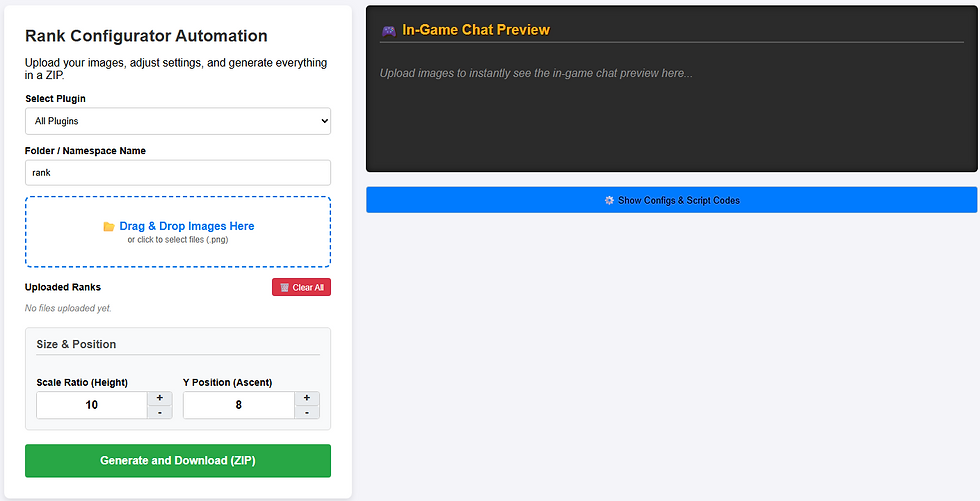
PLUGIN SELECTION

LIVE PREVIEW

POSITION SETTING [Y Position (Ascent)]

SIZE SETTING [Scale Ratio (Height)]

ItemsAdder Setup
1. Firstly run /papi ecloud download LuckPerms then /papi reload
2. Download Skript (click to download) plugin then open "Skripts" folder from product file then put rank_ia_setup.sk to your server "plugins\Skript\scripts" path then run /sk reload all command then run /skript:rank_ia_setup
2.1 If you don't want to use Skript, also you can run this commands as manuel for every rank:
/lp group <your_group_name> meta setprefix 1 "&f%img_<rank_png_name>% &f"
Some examples as Owner and VIP+:
/lp group owner meta setprefix 1 "&f%img_owner% &f"
/lp group vip+ meta setprefix 1 "&f%img_vipplus% &f"
RANK SHOW IN TAB
3. Open Config Files\TAB folder then put groups.yml to your server "plugins\TAB" path.
RANK SHOW IN CHAT
4. Use LPC (click to download) plugin for chat.
RANK SHOW IN SCOREBOARD
5. Use %luckperms_prefix% placeholder. Also you can use this placeholder in everywhere for rank show, an expamle in gui or lore.
Nexo Setup
ACTIVATE RANK SHOW VIA LUCKPERMS
1. Firstly run /papi ecloud download LuckPerms then /papi reload
2. Download Skript (click to download) plugin then open "Skripts" folder from product file then put rank_nexo_setup.sk to your server "plugins\Skript\scripts" path then run /sk reload all command then run /skript:rank_nexo_setup
2.1 If you don't want to use Skript, also you can run this commands as manuel for every rank:
/lp group <your_group_name> meta setprefix 1 "&f%nexo_<rank_png_name>% &f"
Some examples as Owner and VIP+:
/lp group owner meta setprefix 1 "&f%nexo_owner% &f"
/lp group vip+ meta setprefix 1 "&f%nexo_vipplus% &f"
RANK SHOW IN TAB
3. Open Config Files\TAB folder then put groups.yml to your server "plugins\TAB" path.
RANK SHOW IN CHAT
4. Use LPC (click to download) plugin for chat.
RANK SHOW IN SCOREBOARD
5. Use %luckperms_prefix% placeholder. Also you can use this placeholder in everywhere for rank show, an expamle in gui or lore.
Oraxen Setup
ACTIVATE RANK SHOW VIA LUCKPERMS
1. Firstly run /papi ecloud download LuckPerms then /papi reload
2. Download Skript (click to download) plugin then open "Skripts" folder from product file then put rank_oraxen_setup.sk to your server "plugins\Skript\scripts" path then run /sk reload all command then run /skript:rank_oraxen_setup
2.1 If you don't want to use Skript, also you can run this commands as manuel for every rank:
/lp group <your_group_name> meta setprefix 1 "&f%oraxen_<rank_png_name>% &f"
Some examples as Owner and VIP+:
/lp group owner meta setprefix 1 "&f%oraxen_owner% &f"
/lp group vip+ meta setprefix 1 "&f%oraxen_vipplus% &f"
RANK SHOW IN TAB
3. Open Config Files\TAB folder then put groups.yml to your server "plugins\TAB" path.
RANK SHOW IN CHAT
4. Use LPC (click to download) plugin for chat.
RANK SHOW IN SCOREBOARD
5. Use %luckperms_prefix% placeholder. Also you can use this placeholder in everywhere for rank show, an expamle in gui or lore.
Vanilla Setup
ACTIVATE RANK SHOW VIA LUCKPERMS
1. Firstly run /papi ecloud download LuckPerms then /papi reload
2. Download Skript (click to download) plugin then open "Skripts" folder from product file then put rank_vanilla_setup.sk to your server "plugins\Skript\scripts" path then run /sk reload all command then run /skript:rank_vanilla_setup
2.1 If you don't want to use Skript, also you can run this commands as manuel for every rank:
/lp group <your_group_name> meta setprefix 1 "&fꐚ &f"
Some examples as Owner and VIP+:
/lp group owner meta setprefix 1 "&fꐚ &f"
/lp group vip+ meta setprefix 1 "&fꐣ &f"
Note: "ꐚ" is just an example symbol, you should find every rank symbol.
RANK SHOW IN TAB
3. Open Config Files\TAB folder then put groups.yml to your server "plugins\TAB" path.
RANK SHOW IN CHAT
4. Use LPC (click to download) plugin for chat.
RANK SHOW IN SCOREBOARD
5. Use %luckperms_prefix% placeholder. Also you can use this placeholder in everywhere for rank show, an expamle in gui or lore.

Ayo